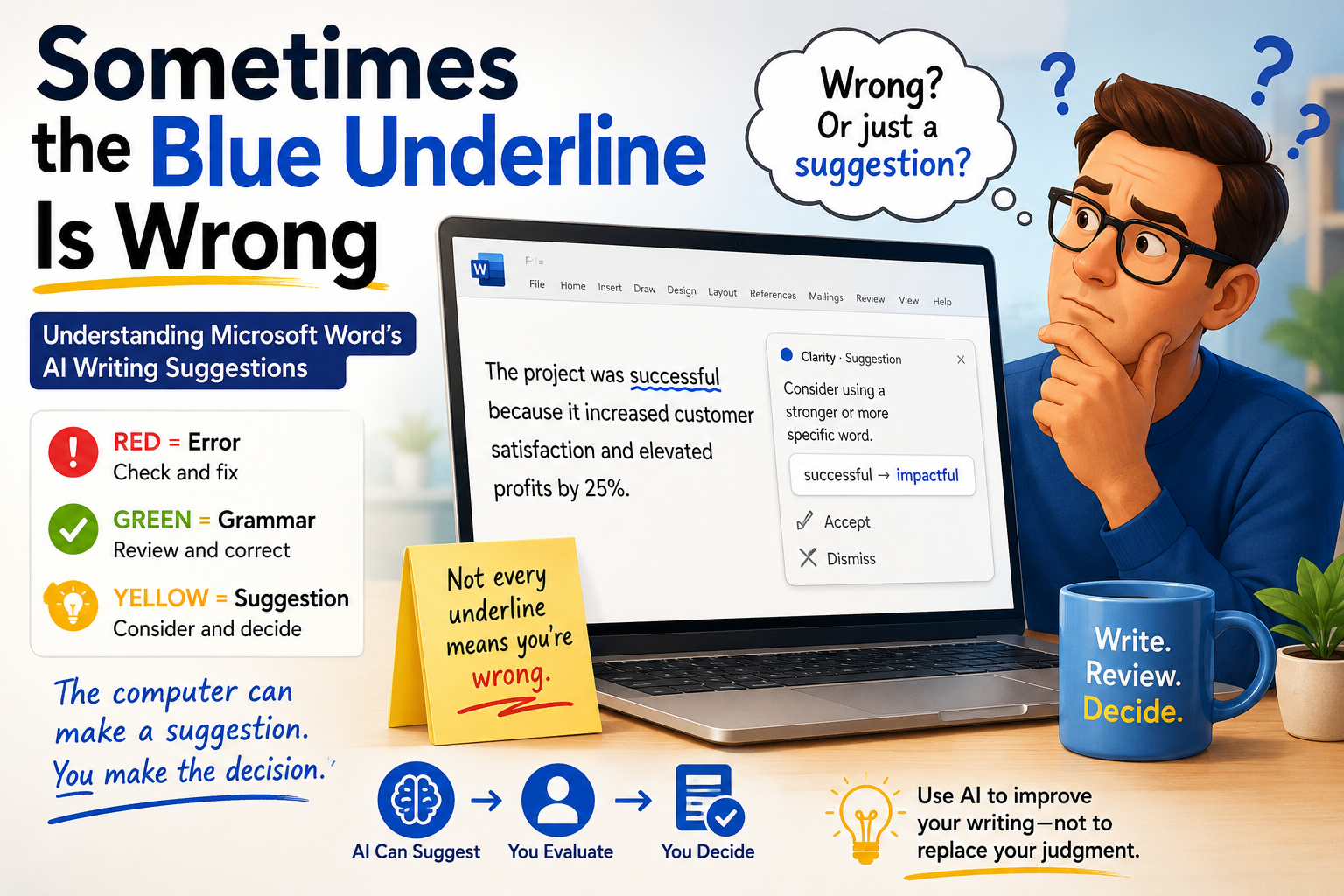
Sometimes the Blue Underline Is Wrong
What Microsoft Word’s AI Is Really Telling You
A story about grammar, artificial intelligence, changing language, and why writers still need to trust their own judgment
A Real Classroom Example: “Pubic Speaking”
I have been teaching Microsoft Office for approximately 30 years. During that time, I have watched Microsoft Word evolve through generations of technology. I remember working with Office 95, 97, 2000, 2003, 2007, 2010, Microsoft 365, and the many changes in between.
About twenty years ago, one of the teachers I worked with was preparing a presentation about Public Speaking. Unfortunately, the presentation title said “Pubic Speaking.”
The old spellchecker did not underline the word. Why? Because “pubic” is a correctly spelled English word. The computer was doing exactly what a traditional spellchecker was designed to do: check spelling, not truly understand context.
It was technically correct—and practically hilarious.
A human reader could immediately understand the intended meaning. The old spellchecker couldn’t. It was checking words, not truly understanding language.
But Modern Word Has Created a Different Problem
Today’s Microsoft Word is far more sophisticated. Modern writing assistance can consider context, sentence structure, clarity, conciseness, formality, word choice, and other characteristics of writing.
That is a genuine improvement. But the software also became much more willing to make judgments about our writing.
The danger is that users may give every recommendation the authority of a correction.
When Does a Correction Become a Recommendation?
A spelling error or subject-verb agreement problem is relatively straightforward. But when Word says, “Consider using another word,” we enter different territory. The original word may be perfectly acceptable, deliberately chosen, more natural for the audience, or part of the writer’s personality.
Suddenly, the computer isn’t necessarily correcting the writer. It is making a recommendation.
I Started Looking More Closely at Word’s Options
I examined the Microsoft Word Grammar and writing options shown in my screenshots and counted them. The result was surprising: 136 distinct options across 12 screenshots, with 139 visible option lines because three items appeared again during scrolling: Missing Preposition, Punctuation, and Too Many Verbs.
The important discovery was that these options are not all doing the same job.
Three Different Kinds of Writing Feedback
1. Traditional Language Mechanics
- Spelling
- Punctuation
- Subject-verb agreement
- Verb tense
- Sentence fragments
- Missing words
- Word order
- Grammar
- Syntax
- Basic sentence structure
These generally ask: “Is there something wrong with the construction of this sentence?”
2. Writing Quality and Style
- Clarity
- Conciseness
- Wordiness
- Clichés
- Weak verbs
- Unnecessary words
- Unnecessary adverbs
- Vocabulary
- Formality
- Jargon
- Informal language
- Passive voice
- Repetition
- Conventional phrasing
These are not necessarily questions of right and wrong. They ask whether something could be expressed differently. That is useful, but fundamentally different from saying that something is grammatically incorrect.
3. Social and Cultural Interpretation
- Age bias
- Cultural bias
- Disability bias
- Ethnic slurs
- Gender bias
- Gendered pronouns
- Gender-specific language
- Mental-health bias
- Racial bias
- Sexual-orientation bias
- Socioeconomic bias
- Sensitive geopolitical references
- Profanity
- Slang
- Region-specific language
These involve culture, society, audience, history, context, and changing conventions. Language judgments can become subjective when they move beyond grammar into social and cultural interpretation.
What Is “Correct” Language?
Language is influenced by country, region, culture, generation, education, profession, religion, local customs, socioeconomic circumstances, personal experience, political and ideological perspectives, and intended audience. Sometimes there is a clear answer. Sometimes there isn’t.
Context matters enormously.
The Problem With Turning Everything On
Turning every option on sounds logical: more checking must be better. Not necessarily. A document could receive many suggestions, yet some may be genuine errors, some useful improvements, some stylistic preferences, some audience-dependent, and some recommendations the writer legitimately rejects.
The goal should not be maximum suggestions. The goal should be maximum useful suggestions.
More Feedback Doesn’t Always Mean Better Feedback
If a system gives one important warning, you pay attention. If it gives hundreds, you can become numb to them. Writers may eventually accept everything automatically or ignore everything completely.
The Beginner Faces a Bigger Problem
An experienced writer can look at an underline and say, “Nope. I’m keeping my sentence.” A beginner may not have that confidence. Dozens of recommendations can make a student think, “I don’t know how to write,” when many suggestions may simply be alternatives.
The Blue Underline Can Become an Authority Signal
For many years, computer users developed a visual language: an underline meant, “Pay attention. Something is wrong here.” If someone has seen that signal for 10, 20, or 30 years, the response becomes almost automatic.
- You see the underline.
- You stop.
- You question the sentence.
- You question the syntax.
- You question your wording.
- Eventually, you may even question your ability to write properly.
But sometimes the software isn’t saying, “You are wrong.” It may be saying, “I prefer another way of expressing this.”
The good news! Blue is not always a problem. Here is a story about a blue pen and handwriting.
This Is a New Form of Communication
When a person has spent decades seeing an underline as a warning that something is wrong, that association becomes deeply ingrained. When the software changes, the person has to learn a new form of communication from the software.
The user isn’t necessarily becoming a worse writer. The rules of the interaction have changed.
What Happens When AI Becomes More Sophisticated?
The old spellchecker was less sophisticated but easier to understand. The modern writing assistant is far more sophisticated but potentially less trustworthy as an authority.
Sophistication allows the system to make more nuanced judgments. But nuanced judgments aren’t always objective.
More sophisticated does not necessarily mean more authoritative.
Real-World Knowledge Matters
A grammar checker knows rules. A style checker recognizes patterns. An AI can analyze enormous amounts of language. But the writer has something the software may not have: real-world knowledge and lived experience.
- Why a particular word was chosen
- Who the audience is
- What actually happened
- What the writer is trying to accomplish
- What emotional reaction is intended
- What information is important
- What information should be left alone
- What cultural context surrounds the statement
- What the writer personally experienced
Efficiency Isn’t Always Better
AI systems often try to make writing more concise. Usually that is useful. But sometimes the “inefficient” version is better.
“My grandfather used to sit on that porch every Sunday afternoon, and even now I can still hear him laughing before I open the gate.”
A style assistant might prefer a shorter version: “My grandfather sat on the porch every Sunday.” The second sentence is efficient, but something has disappeared: sound, memory, anticipation, emotional connection, and the writer’s relationship with the place.
The first sentence has heart and soul.
Grammar Can Be Correct While the Writing Is Still Wrong
1. Technically correct
Does the sentence follow the grammatical rules?
2. Functionally correct
Does the sentence accomplish what the writer needs it to accomplish?
3. Humanly correct
Does it communicate the experience, emotion, personality, intention, or meaning the writer wants the reader to receive?
Sometimes Punctuation Has a Purpose
Sometimes I use a comma or another punctuation mark not because it is grammatically required, but because I want the reader to pause. Punctuation can control pace, timing, emphasis, suspense, emotion, rhythm, and reader attention.
“I knew he was lying, but I waited.”
“I knew he was lying—but I waited.”
The punctuation changes the rhythm. Likewise, “She opened the door. And stopped.” may deliberately create a dramatic pause even though a traditional grammar checker might question the fragment.
Not Every Violation of a Rule Is an Error
Not every deviation from a rule is an error. Sometimes it is a choice.
A good writer knows the rules. A great writer also knows when breaking one serves the reader.
The Problem With “Make Every Underline Disappear”
The objective of writing isn’t: Make Microsoft Word happy.
The objective is: Communicate something effectively to another human being.
A student should eventually be able to say: “I understand why Word suggested that. But the original wording is better for my purpose, and I can explain why.” That’s writing competence.
What About Older English Teachers?
Teachers who learned traditional grammar rules decades ago may sometimes resist newer recommendations. That should not automatically be dismissed as resistance to change. An experienced teacher may correctly recognize that a recommendation is not a grammar error.
At the same time, an experienced teacher can recognize that a convention has changed. The best response is to explain the traditional rule, the newer convention, why the convention changed, and which version is appropriate for the audience.
That’s education.
We Should Teach Students How to Disagree With AI
We are increasingly teaching students how to use AI and verify AI-generated information. We should also teach them how to disagree with AI.
The AI suggested this change. I understand the reason. But the original wording is better for my purpose.
That isn’t failure. That’s judgment.
Different Writers Need Different Word Settings
A resume writer
- Professional language
- Clarity
- Conciseness
- Strong verbs
- Correct spelling
- Correct grammar
- Consistency
A researcher
- Precision
- Clarity
- Grammar
- Consistency
- Formality
A blogger
- Conversational language
- Humor
- Slang
- Short sentences
- Personality
- Repetition
A teacher
- Clarity
- Accuracy
- Accessibility
- Appropriate vocabulary
- Audience awareness
A political speech writer
- Repetition
- Rhetorical questions
- Short fragments
- Emotional language
- Metaphors
- Informal expressions
- Memorable phrases
A political speech may deliberately use repetition, fragments, emotion, and rhetorical devices. What looks like a writing flaw can be exactly what the speaker needs.
The Better Principle
Configure your writing assistant for the job you’re doing.
A resume doesn’t need the same settings as a novel. A scientific paper doesn’t need the same settings as a blog. A political speech doesn’t need the same settings as a legal document. A marketing campaign doesn’t need the same settings as a university thesis.
More options are not automatically better. Relevant options are better.
And Then There Is the Resume Problem
Your first submitted resume is not a practice run.
Treat it as if someone important will see it—and as if the information you submit may travel farther and last longer than you expect.
Before submitting, verify employment dates, job titles, certifications, education, software skills, accomplishments, and numbers. Check spelling, formatting, reading order, the final uploaded version, and whether the resume matches the job.
AI can help improve wording. It cannot guarantee that your facts are true. No grammar checker can tell you whether your accomplishment is actually impressive to the employer.
The First Resume Should Be Your Best Resume
Do your experimenting privately. Create a master resume, create tailored versions, ask AI to challenge them, question recommendations, verify everything, and then submit the version you are proud to stand behind.
Write → Review → Challenge → Verify → Human judgment → Submit.
My Recommendation to Microsoft
Please preserve the traditional meaning of the error indicators—and create a separate visual language for recommendations.
For decades, Word users learned a visual language. A color or underline communicated: “Something is wrong here.” Modern writing assistance can instead communicate a preference or suggestion. Those aren’t necessarily errors. So why make them look like errors?
My Proposed Color System
- 🔴 Red — Spelling or likely error.
- 🟢 Green — Grammar, syntax, agreement, or structural problem.
- 🟡 Yellow — Suggestion or consideration: style, preference, alternative wording, clarity, conciseness, cultural consideration, inclusive-language consideration, formality, vocabulary, or other contextual recommendations.
The message becomes: “Think about this.” rather than “You’re wrong.”
Why This Matters to Human Confidence
This isn’t just a user-interface issue. It can become an educational issue, a confidence issue, and a human-AI relationship issue.
If a person has spent twenty years seeing a particular underline as a warning that something is wrong, that association becomes deeply ingrained. They may wonder whether they misunderstand grammar or whether their English is good enough.
They may simply be learning a new communication system from their software.
I hope Microsoft will appreciate my suggestion and take it into consideration for the next revision.
The Human Being Still Has the Final Say
After 30 years of teaching Microsoft Office, I don’t want students to become afraid of technology. I want them to become better at using it. I don’t want them to reject AI. I want them to understand it. And I don’t want them to blindly accept AI recommendations. I want them to question them intelligently.
- Purpose
- Experience
- Context
- Judgment
- Personality
- Memory
- Emotion
And sometimes—heart and soul.
The Bigger Lesson
This entire discussion began with a funny mistake from approximately twenty years ago: “Pubic Speaking.” The old spellchecker couldn’t understand why that was a problem because pubic was a correctly spelled word.
Today, we have almost the opposite situation. The computer can understand far more about language, but because it understands more, it also makes more judgments.
- Some identify errors.
- Some improve writing.
- Some express preferences.
- Some reflect changing social and cultural conventions.
- Some depend on audience and context.
- Some may simply represent another reasonable way of saying something.
That’s why the human writer matters more—not less.
The more Word moves from correcting language to interpreting language, the more important it becomes to distinguish an error from a recommendation.
Don’t Optimize the Humanity Out of Your Writing
Technology is extraordinarily good at optimization. It can make a sentence shorter, more formal, more conventional, more consistent, and easier to scan.
But the shortest sentence isn’t always the best sentence. The most formal sentence isn’t always the best sentence. The most conventional sentence isn’t always the most memorable sentence. And the sentence with the fewest underlines isn’t necessarily the best sentence.
Sometimes the awkward phrase is important. Sometimes the repetition matters. Sometimes the comma is there because the writer wants you to stop. Sometimes the long sentence carries a memory. Sometimes a fragment creates emotion. Sometimes an unusual word gives the writer a voice.
And sometimes the best sentence is the one that only you would have written.
The Rule I Would Teach Every Writer
Use AI to challenge your writing—not to replace your judgment.
- Write it yourself.
- Let the software challenge you.
- Ask why.
- Investigate the recommendation.
- Keep what improves the writing.
- Reject what doesn’t.
- Verify your facts.
- Consider your audience.
- Protect your voice.
- Never assume that an underline automatically means: “You are wrong.”
Sometimes it means: “Here is another possibility.”
And My Recommendation in One Sentence
Red and green should tell me to check my writing. Yellow should tell me that Microsoft has an idea.
— Attila Farkas
A Note About the Human–AI Collaboration Behind This Article
This article grew out of a real brainstorming conversation between a human writer and an AI writing partner. It did not begin as a polished thesis. It began with a classroom memory: a teacher, a presentation about “Public Speaking,” and the wonderfully unfortunate phrase “Pubic Speaking.”
From there, we questioned what modern writing assistants are actually doing, examined Word’s many grammar and style options, discussed the difference between an error and a recommendation, explored the effects on students and inexperienced writers, considered resumes and professional communication, and debated culture, lived experience, human judgment, punctuation, voice, and emotion.
The most valuable part of the process was the back-and-forth: one idea led to another, questions challenged assumptions, examples made abstract concepts concrete, and the discussion kept returning to the same central principle—technology should help people communicate better without taking away their ability to think, decide, and express themselves.
A brainstorming session that began with a funny spelling mistake became a much larger conversation about the future of writing.
Perhaps that is one of the most exciting possibilities of human–AI collaboration. A conversation can take an ordinary observation from one person’s classroom experience and develop it into an idea that may help thousands—or perhaps millions—of people think differently about writing, communication, artificial intelligence, and their own judgment.
The goal isn’t for AI to write instead of us. The goal is for human experience and AI capabilities to work together to create something neither could have produced as effectively alone.
Keyword Cluster / SEO Tags
Primary keywords: Microsoft Word blue underline; Microsoft Word grammar checker; Microsoft Word AI; Microsoft Editor; Word grammar suggestions; Word writing assistant
Secondary keywords: AI writing assistant; Microsoft Word grammar check; blue underline in Word; Word grammar settings; Word Editor suggestions; AI writing tools; AI grammar checker; Word style suggestions; Microsoft 365 Editor; grammar checker accuracy
Long-tail keywords: Why is Microsoft Word using a blue underline?; Is Microsoft Word grammar checker always correct?; Can Microsoft Word grammar suggestions be wrong?; Microsoft Word AI writing suggestions; Should I accept Microsoft Word grammar suggestions?; Microsoft Word style recommendations; How AI is changing grammar checking; AI writing assistants and student writers; Microsoft Word inclusive language suggestions; AI and grammar checking; Should writers trust AI grammar checkers?; Microsoft Word writing options; Microsoft Word grammar settings; How many grammar options does Microsoft Word have?; Microsoft Word blue underline meaning; AI writing and human judgment; AI writing assistants and education; AI writing assistants and student confidence; grammar checker vs writing assistant; difference between grammar correction and writing recommendation
Topic/tag cluster: Microsoft Word · Microsoft 365 · Microsoft Editor · AI Writing · AI Writing Assistant · Grammar Checker · Grammar Checking · Spellcheck · Blue Underline · Writing Style · Writing Recommendations · Inclusive Language · Cultural Bias · Gender Bias · Age Bias · Disability Bias · Racial Bias · Language and Culture · AI Literacy · Digital Literacy · Writing Education · Student Writers · Resume Writing · Resume Tips · Professional Writing · Human AI Collaboration · Human Judgment · Writing Confidence · Critical Thinking · AI and Education · Future of Writing · Effective Communication